If you have ever stared at the OCPI 2.2.1 spec trying to reverse-engineer what an actual request looks like, this article is the shortcut. Below are copy-paste-ready request examples for the three modules people reach for first — Locations, Sessions, and CDRs — with the real HTTP method, the endpoint path, the headers that matter, and a fully populated JSON body for each. No hand-waving, no “the object contains the following fields.” Just the requests.
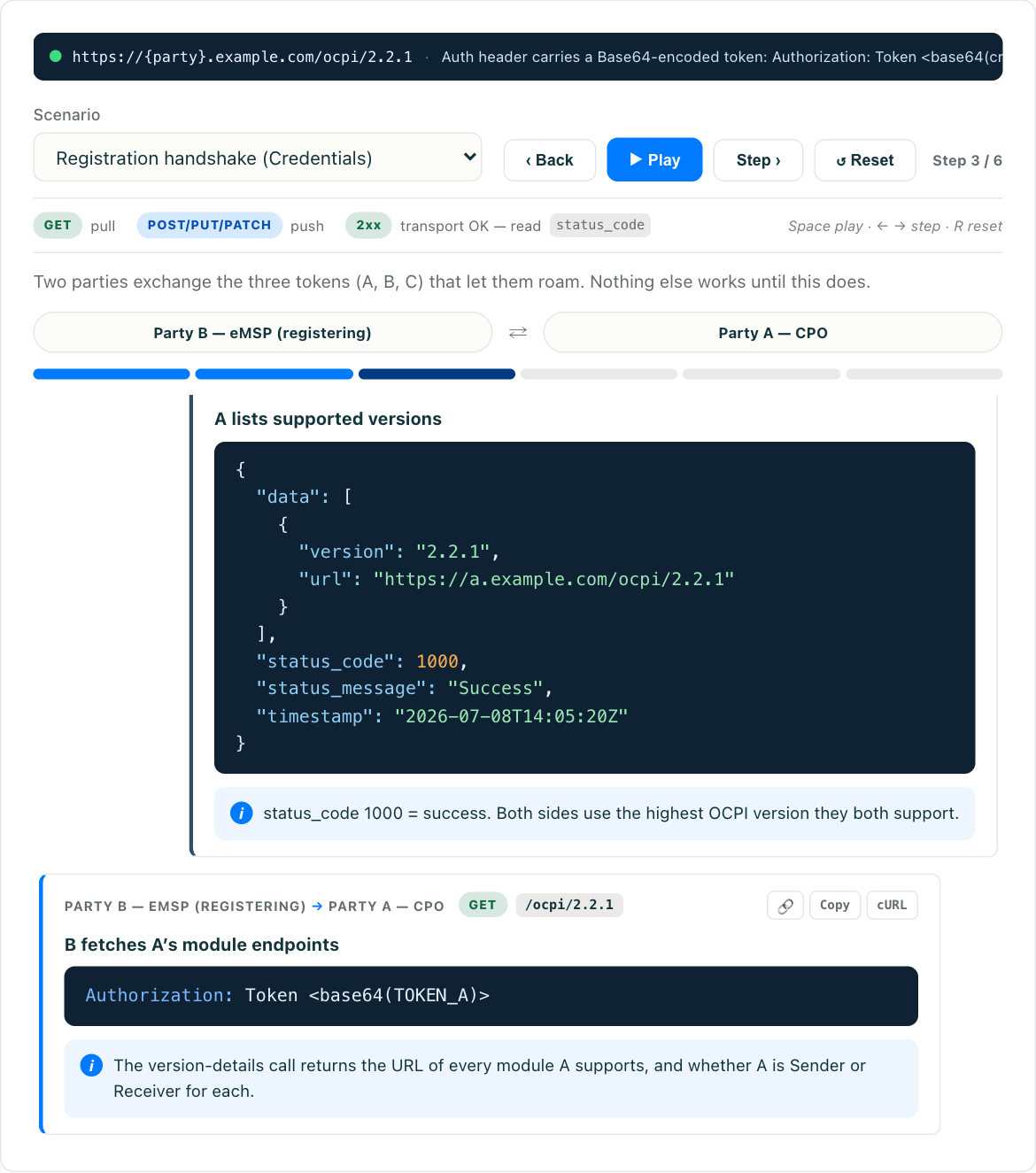
Reading a payload is one thing; watching it move between a CPO and an eMSP is another. Once you have the shapes below in your head, try the interactive OCPI Simulator to replay the credentials handshake and push these same objects across a live connection — it is the fastest way to see why a request succeeds or gets a 2001 back.
The parts every OCPI request shares
Before the module-specific bodies, three things are constant across almost every OCPI call, and getting them wrong causes most first-day failures.
The endpoint is versioned and role-scoped. OCPI URLs are not fixed — you discover them from the other party’s versions endpoint during the handshake. But they follow a predictable shape:
https://cpo.example.com/ocpi/cpo/2.2.1/locations
https://emsp.example.com/ocpi/emsp/2.2.1/sessions
The cpo or emsp segment tells you which role hosts that copy of the module. Locations are hosted by the CPO and pulled or pushed to the eMSP; Sessions and CDRs are hosted by the eMSP and pushed to by the CPO.
The Authorization header is mandatory. After credentials are exchanged, every functional request carries:
Authorization: Token <base64-token>The word Token is literal (it is the scheme name, not the value), and in OCPI 2.2 and later the token itself is base64-encoded. Forget the encoding and you get a 401. This trips up nearly everyone once.
Responses are wrapped in an envelope. You never get a bare object back. OCPI wraps every response body:
{
  "data": { },                  // object, or array for list endpoints
  "status_code": 1000,          // 1000 = success; 2xxx = client error; 3xxx = server
  "status_message": "Success",
  "timestamp": "2026-07-12T09:30:00Z"
}
Check status_code, not just the HTTP status. A 200 OK with status_code: 2001 means your request was understood but rejected. This split between transport status and application status is one of the first things the OCPI overview makes clear, and it matters more than people expect.
Locations: a GET request and its response
Locations is the map — where the stations are, what connectors they have, whether they are live. The eMSP most often reads it. A paginated pull looks like this:
GET /ocpi/cpo/2.2.1/locations?date_from=2026-07-01T00:00:00Z&limit=50
Host: cpo.example.com
Authorization: Token bXktc2VjcmV0LXRva2Vu
Accept: application/json
The date_from filter and limit are how you page through a large catalog without re-pulling everything. The response wraps an array of Location objects; here is one, trimmed to the load-bearing fields:
{
  "country_code": "US",
  "party_id": "EVC",
  "id": "LOC_10021",
  "publish": true,
  "name": "Downtown Garage - Level 3",
  "address": "425 Market Street",
  "city": "San Francisco",
  "postal_code": "94105",
  "state": "CA",
  "country": "USA",
  "coordinates": {
    "latitude": "37.79130",
    "longitude": "-122.39690"
  },
  "evses": [
    {
      "uid": "EVSE_10021_1",
      "evse_id": "US*EVC*E10021001",
      "status": "AVAILABLE",
      "connectors": [
        {
          "id": "1",
          "standard": "IEC_62196_T1_COMBO",
          "format": "CABLE",
          "power_type": "DC",
          "max_voltage": 920,
          "max_amperage": 500,
          "max_electric_power": 350000,
          "tariff_ids": ["TARIFF_DC_PEAK"],
          "last_updated": "2026-07-11T18:04:00Z"
        }
      ],
      "last_updated": "2026-07-11T18:04:00Z"
    }
  ],
  "time_zone": "America/Los_Angeles",
  "last_updated": "2026-07-11T18:04:00Z"
}
A few things worth internalizing: evse_id (the roaming-visible identifier) is different from uid (the internal, opaque key you use in URLs). status lives on the EVSE, not the connector. And max_electric_power is in watts — 350000, not 350. The full field map, including the many optional facility and image fields, is in the Locations module deep-dive.
Sessions: pushing a live session with PUT and PATCH
A Session is a living object. The CPO creates it on the eMSP with a full PUT the moment charging starts, then streams updates with PATCH. Here is the initial push:
PUT /ocpi/emsp/2.2.1/sessions/US/EVC/SESSION_45501
Host: emsp.example.com
Authorization: Token bXktc2VjcmV0LXRva2Vu
Content-Type: application/json
{
"country_code": "US",
"party_id": "EVC",
"id": "SESSION_45501",
"start_date_time": "2026-07-12T09:15:00Z",
"kwh": 0,
"cdr_token": {
"country_code": "DE",
"party_id": "IONE",
"uid": "DE-IONE-C1234567890-1",
"type": "RFID",
"contract_id": "DE-IONE-C1234567890-1"
},
"auth_method": "AUTH_REQUEST",
"location_id": "LOC_10021",
"evse_uid": "EVSE_10021_1",
"connector_id": "1",
"currency": "USD",
"status": "ACTIVE",
"last_updated": "2026-07-12T09:15:00Z"
}Note that the URL carries the country_code, party_id, and session id as path segments — that trio uniquely addresses the object. Once the session is live, the CPO does not re-send the whole thing. It sends only what changed:
PATCH /ocpi/emsp/2.2.1/sessions/US/EVC/SESSION_45501
Host: emsp.example.com
Authorization: Token bXktc2VjcmV0LXRva2Vu
Content-Type: application/json
{
"kwh": 18.4,
"status": "ACTIVE",
"last_updated": "2026-07-12T09:34:12Z"
}That last_updated field is doing real work. If two PATCH requests arrive out of order — common on a busy connection — the eMSP compares timestamps and discards the older one, so the session never appears to “go backwards.” Building the receiver correctly means treating last_updated as the tiebreaker, a point the Sessions module walkthrough covers in depth. The running kwh and total_cost in a Session are estimates; the authoritative billing number arrives later, in the CDR.
CDRs: posting the final billing record
When a session ends, the CPO posts a Charge Detail Record — the immutable, billable summary. Unlike Sessions, a CDR is created once with a POST and never modified:
POST /ocpi/emsp/2.2.1/cdrs
Host: emsp.example.com
Authorization: Token bXktc2VjcmV0LXRva2Vu
Content-Type: application/json
{
"country_code": "US",
"party_id": "EVC",
"id": "CDR_88120",
"start_date_time": "2026-07-12T09:15:00Z",
"end_date_time": "2026-07-12T09:42:33Z",
"session_id": "SESSION_45501",
"cdr_token": {
"country_code": "DE",
"party_id": "IONE",
"uid": "DE-IONE-C1234567890-1",
"type": "RFID",
"contract_id": "DE-IONE-C1234567890-1"
},
"auth_method": "AUTH_REQUEST",
"cdr_location": {
"id": "LOC_10021",
"evse_uid": "EVSE_10021_1",
"evse_id": "US*EVC*E10021001",
"connector_id": "1",
"connector_standard": "IEC_62196_T1_COMBO",
"connector_format": "CABLE",
"connector_power_type": "DC",
"coordinates": { "latitude": "37.79130", "longitude": "-122.39690" }
},
"currency": "USD",
"tariffs": [ { } ],
"charging_periods": [
{
"start_date_time": "2026-07-12T09:15:00Z",
"dimensions": [ { "type": "ENERGY", "volume": 42.7 } ]
}
],
"total_cost": { "excl_vat": 18.90, "incl_vat": 20.60 },
"total_energy": 42.7,
"total_time": 0.458,
"last_updated": "2026-07-12T09:42:40Z"
}The CDR snapshots everything it needs to stand alone: the location, the tariff that applied, and each charging period. That is deliberate — a CDR must remain valid and auditable even after the live Location or Tariff changes. And because it is immutable, corrections are not edits. To fix a CDR you post a credit CDR that references the original, a pattern explained fully in the CDRs module guide. The cdr_location here is a compact snapshot, not a full Location object — a distinction that surprises people who expect the two to match.
Why these break, and how to see it live
Reading three well-formed requests makes OCPI look easy. In practice the failures are mundane and repetitive:
- Missing or unencoded
Authorizationtoken — a401, or a400if the scheme word is dropped. - Path/body mismatch — the
idin the URL disagrees with theidin the body on a Session PUT. - Wrong role in the path — pushing a Session to
/cpo/instead of/emsp/. - Ignoring
status_code— treating a200 OKwithstatus_code: 2001as a success. - Applying a stale PATCH — no
last_updatedcheck on the receiving side.
None of these show up until you send a real request against a real counterparty. That is exactly what the OCPI Simulator is for: paste these bodies in, watch the envelope come back, break a header on purpose, and see which status_code you get. Seeing the handshake and the push happen end to end teaches the protocol far faster than the spec PDF does — and it is the difference between “I read the OCPI examples” and “I can debug an OCPI integration.”