If you have ever tried to learn OCPI, you have probably hit the same wall: the protocol only really makes sense when you watch two parties talk to each other, but you cannot watch two parties talk until you have a roaming partner — and you do not want a roaming partner until you understand the protocol. It is a genuine chicken-and-egg problem, and it stops a lot of people at the reading-the-spec stage.
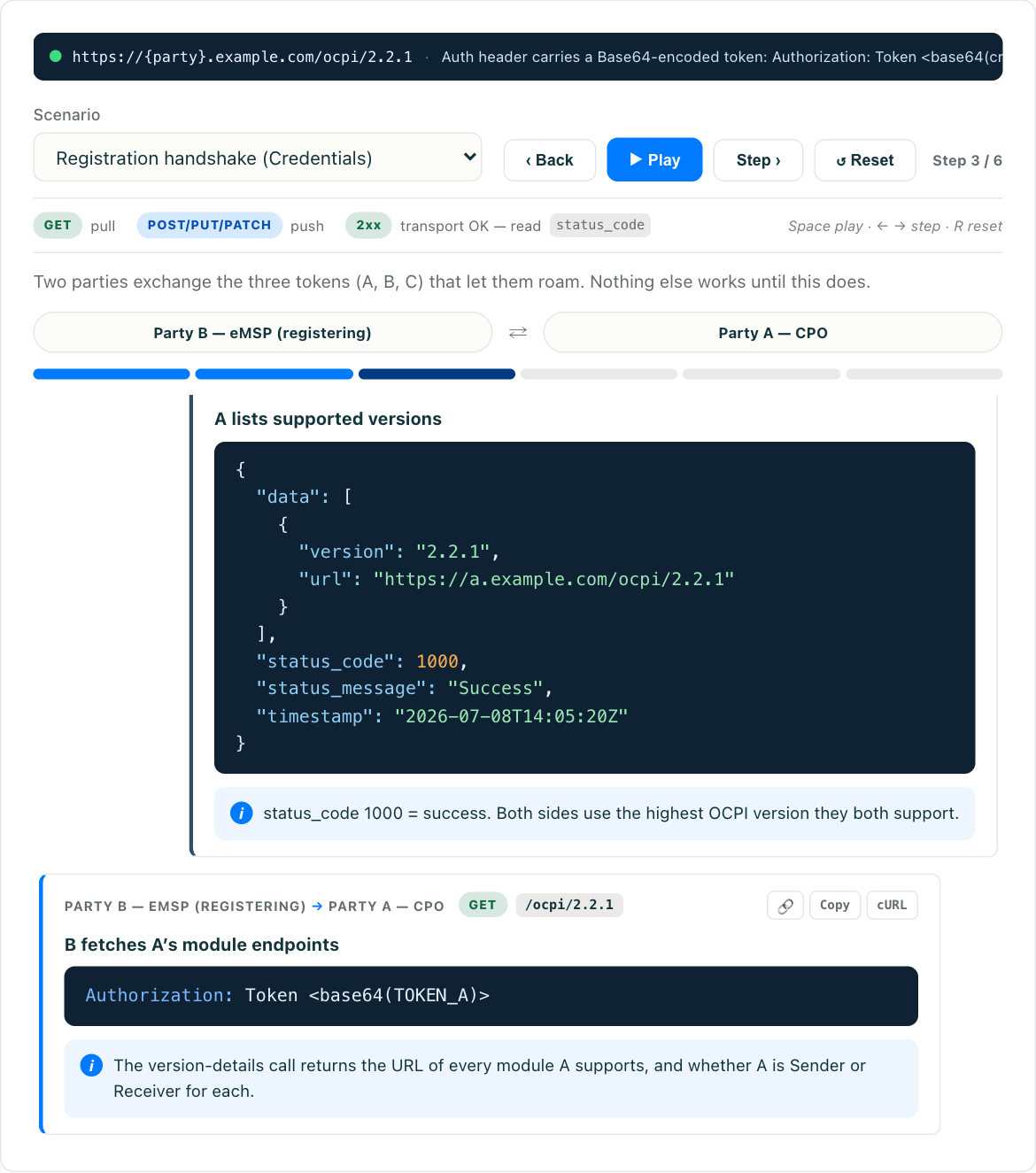
A sandbox breaks that loop. Instead of waiting on a partner’s test endpoints, you step through a complete OCPI 2.2.1 flow against a simulated counterparty and watch every request and response go by. You can try the interactive OCPI simulator right now — it stands in for the other side of the connection so you can run the whole sequence, from the credentials handshake to a final CDR, before you have signed a single roaming agreement. This article walks through what that full flow looks like and why practicing it in a sandbox is the fastest way to get fluent.
Why a sandbox beats reading the spec first
The OCPI specification is well written, but it is a reference document, not a tutorial. It describes each module in isolation — object shapes, endpoints, allowed values — and leaves you to assemble the choreography in your head. The parts that trip people up are almost never the field definitions. They are the sequencing: which side initiates, what happens asynchronously, and how a call you send comes back to you later through a different endpoint.
A sandbox makes that choreography visible. You are not memorizing that Commands are asynchronous; you send a START_SESSION command, get an immediate acknowledgement, and then watch the real result arrive separately as a CommandResult. That single observation teaches more than a paragraph ever will. If you want the conceptual grounding first, what OCPI is and why it exists sets the stage — but the sandbox is where the concepts turn into muscle memory.
The full flow, start to finish
Here is the sequence a sandbox lets you run end to end. Every step below is something you can trigger and inspect rather than imagine.
1. The credentials handshake
Every OCPI relationship opens with the same ritual: two parties exchange a Token A, then use the credentials and versions endpoints to agree on a version, register with each other, and swap the long-lived Token B and Token C used for real traffic. This is small, mandatory, and disproportionately bug-prone — expired tokens, unreachable version endpoints, mismatched country_code or party_id, rotation happening mid-flight.
Running it in a sandbox is valuable precisely because it is so easy to get subtly wrong. You see the version negotiation resolve, watch the registration exchange complete, and understand what “both sides now trust each other” actually means at the wire level. For the details behind the ceremony, the credentials and versions handshake breaks down each token and endpoint.
2. Locations: the CPO publishes where charging happens
With the handshake done, the CPO exposes its charging infrastructure through the Locations module — sites, EVSEs, connectors, and their live status. In a sandbox you can pull a Location and see the nested structure: a location contains EVSEs, each EVSE contains connectors, each connector carries power, format, and tariff references.
This is also where you first meet OCPI’s two data-transfer styles. The eMSP can pull the full catalogue on a schedule, or the CPO can push incremental updates as status changes. Watching both in a simulator makes the trade-off concrete. If you want to go deeper on the object model afterward, the Locations module covers the hierarchy and the status semantics in full.
3. Sessions: a charge in progress
Once a driver plugs in, the CPO reports the charge through the Sessions module. A Session object updates over the life of the charge — energy delivered, current status, running cost — until it completes. In a sandbox you can watch a session open, tick through intermediate updates, and close, which is the clearest way to internalize that sessions are living objects, not a single end-of-charge record.
This matters for reconciliation later: the session is the real-time view, and it must line up with the billing record that follows.
4. Commands: reaching back into the network
Commands is where OCPI stops being read-only. As an eMSP, you can send a START_SESSION or STOP_SESSION request, or RESERVE_NOW and UNLOCK_CONNECTOR, into the CPO’s network. The important thing to internalize — and the thing a sandbox drives home instantly — is that these are asynchronous. You get an immediate ACCEPTED or REJECTED acknowledgement telling you the request was received, and then, separately, the actual outcome arrives at your callback URL as a CommandResult.
Seeing that two-part pattern once removes a whole class of integration bugs where developers treat the acknowledgement as the result and wonder why nothing seems to happen.
5. CDRs: the charge becomes money
Finally, the completed charge is recorded as a CDR — a Charge Detail Record — the immutable billing document that settles who owes what. A CDR is not editable after the fact; if something is wrong, you issue a correction, you do not mutate the original. In a sandbox you can generate a CDR at the end of a session and compare it against the session data it came from, which is exactly the reconciliation exercise you will do for real in production.
What a sandbox teaches that a spec cannot
Run the sequence above a few times and some patterns click that no amount of reading delivers:
- The response envelope is universal. Every OCPI call — regardless of module — comes back wrapped in the same structure: a
status_code, astatus_message, atimestamp, and thedatapayload. Once you have seen it on five different endpoints, you stop parsing each response as a special case. - Push and pull are a design choice, not a rule. The same
Locationsdata can arrive because you asked for it or because the partner sent it. A sandbox lets you feel the difference in latency and load rather than just reading about it. - Asynchronous is the default mental model. Commands come back later. Sessions update over time. CDRs arrive after the fact. OCPI is an eventually-consistent conversation between two systems, and watching it flow is the fastest way to stop thinking in request-then-immediate-response terms.
Where the sandbox ends and real testing begins
Be honest about the boundary. A sandbox is a teaching and shakeout tool: it gives you a cooperative, well-behaved counterparty that always speaks the spec correctly. That is exactly what you want when you are learning — and exactly what real partners are not.
The bugs that actually hurt in production come from two systems interpreting the same spec differently: an optional field one side treats as required, a status transition one side never emits, a tariff structure that is technically valid but unexpected. No simulator can predict those, because they are disagreements, not errors. So the right progression is: learn the flow in the sandbox, validate your payloads against the JSON schema, then move to a cooperative real partner or a hub for the interpretation differences. For the full testing playbook — mocks, schema validation in CI, and the operational tests that catch real bugs — see OCPI testing tools and strategies (coming soon).
Both European and North American networks lean on this same layered approach. A CPO platform preparing to roam — whether it is a European operator or a North American one like EV Connect — gets the same benefit from rehearsing the handshake-to-CDR flow before wiring up a live eMSP, because the protocol is identical regardless of which market you sit in.
Start with the flow, not the field list
The single best thing you can do to get comfortable with OCPI is to stop reading modules in isolation and watch one complete transaction move through all of them. Handshake, publish, charge, command, settle. Once that sequence is in your head as a story rather than a set of endpoints, the spec reads like documentation for something you already understand.
That is exactly what the sandbox is for. Open the OCPI simulator, run the full flow a couple of times, and pay attention to the shared response envelope and the asynchronous callbacks. It is the closest thing to having a patient roaming partner on the other end — without needing one.