Passing an OCPI handshake in a staging tenant feels like the finish line. It is closer to the starting gun. A green handshake proves the two systems can authenticate and agree on a version — it says nothing about whether your Locations feed matches your hardware, whether a START_SESSION command actually reaches a charger, or whether your CDR totals will survive a partner’s billing reconciliation. Most OCPI go-live incidents are not exotic. They are boring, testable things that nobody exercised before real traffic hit them.
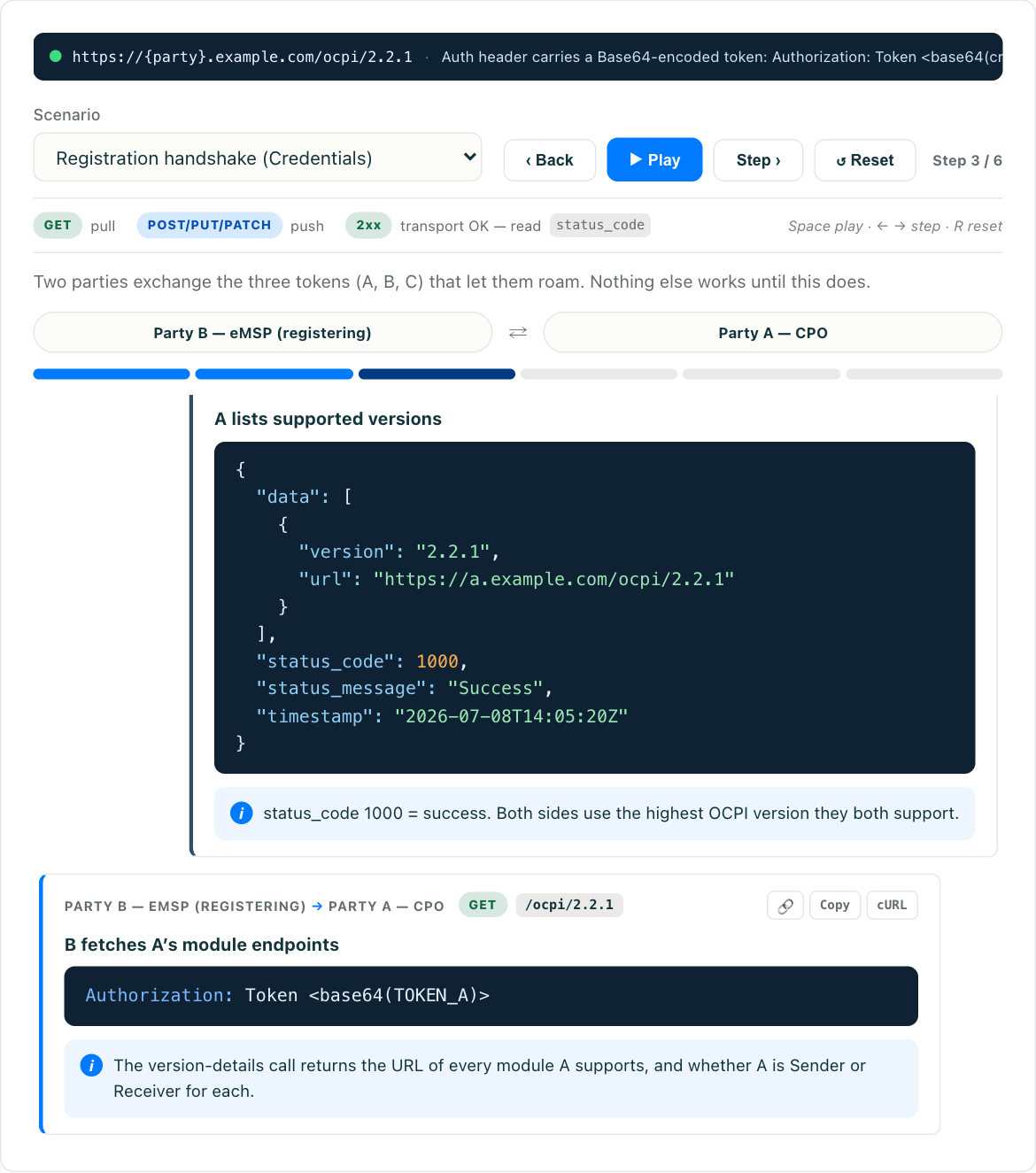
This guide walks the connection test in the order you should actually run it: handshake first, then version negotiation, then each module as a focused smoke test, then the error paths that only show up under pressure. You can run every step below hands-on in the interactive OCPI simulator before you point anything at a partner — drive the handshake, watch the token exchange, and send module calls without needing a cooperative counterparty on the other end.
Step 1: Prove the handshake, both directions
Everything in OCPI rides on the Credentials and Versions modules. If those are wrong, no other test result is trustworthy. Run the full sequence and confirm each hop, rather than trusting a single “connected” indicator:
GET /versionsusing Token A returns the versions you support.GETthe chosen version detail returns the module endpoints, with correct URLs and roles.POST /credentialswith your details completes, you receive the partner’s URL and token, and Token A is now dead.- A follow-up call with the newly exchanged token succeeds; the same call with Token A fails.
That last check matters more than people expect. Token A is a single-use bootstrap credential — if your implementation keeps accepting it after registration, you have a security hole that a test should catch, not a customer. For the full mechanics of the three-token dance and why each token exists, see OCPI credentials and versions.
Test the handshake from both roles if you play both. A platform acting as CPO to one partner and eMSP to another has two distinct registration paths, and it is common for one to be solid while the other was never exercised end to end.
Step 2: Confirm version and module negotiation
A handshake can succeed while quietly agreeing on the wrong thing. Verify:
- Highest common version wins. If you support 2.2.1 and 2.3 and your partner supports 2.1.1 and 2.2.1, the connection must settle on 2.2.1. Force a mismatch in testing and confirm the negotiation picks the right one instead of defaulting to your newest or the partner’s oldest.
- Only advertised modules are called. Your version detail lists the modules and roles you actually implement. If you advertise
Commandsas a receiver, be ready to receive them. If you do not implementChargingProfiles, do not list it. A partner will call what you advertise. - Endpoint URLs resolve. Each module endpoint in the version detail must be reachable with the exchanged token. A copy-paste error in a base URL is a classic staging-passes, production-fails bug.
Step 3: Smoke-test each module you use
Do not try to test everything at maximum depth on day one. For each module in scope, run one realistic happy-path call and confirm the data means what you think it means. Schema validity is necessary but not sufficient — a payload can pass JSON Schema and still be semantically wrong.
Locations. Serve or push a small set of real sites. Then diff what the partner actually receives against your source of truth. Check that:
- Every
EVSEuidis stable and unique, and does not change when status changes. - Connector
power_type,standard, and rated power match the physical hardware. - Status updates (
AVAILABLE→CHARGING→AVAILABLE) propagate within the freshness your partner expects.
A Locations feed that is 95% right still strands drivers at the 5% of connectors it misrepresents — whether that is a Chargefinder-style app in Europe or a network like EV Connect or Electrify America surfacing sites to a North American eMSP.
Sessions and CDRs. Run a full charge lifecycle and follow the money. A Session should open, update, and close; a CDR should then appear with totals that reconcile against the session. Deliberately test the awkward cases: a zero-energy session, a session that spans a tariff change, a very long session. CDR values are what get billed, so a rounding or unit error here is a financial bug, not a cosmetic one.
Tokens and Authorization. If you are a CPO, test real-time authorization and the cached token list. Confirm an unknown token is rejected and a whitelisted token is accepted. If you are an eMSP, confirm your token pushes land and that ALLOWED/BLOCKED states behave.
Commands. START_SESSION, STOP_SESSION, and RESERVE_NOW are asynchronous in OCPI: the initial POST returns an acknowledgement, and the real result arrives later on your command response endpoint. Test that you correctly handle the two-part flow, including the case where the async result never comes. This is exactly the kind of timing behavior that is easier to see in a simulator than to reproduce with a busy partner.
Step 4: Break things on purpose
Happy-path tests tell you the connection can work. Error-path tests tell you it can survive. Before go-live, deliberately trigger the failures your partner will eventually cause, and confirm your side responds with correct OCPI status codes rather than crashing or going silent:
- Bad auth. Send a call with a missing, malformed, or expired token. Expect a clean
2001/2002-class response or an HTTP 401, not a 500. - Wrong identity. Mismatch
country_codeorparty_idbetween the URL path and the credentials. This is one of the most common real-world breakages and should produce a clear rejection. - Malformed payload. Send a body with a missing required field or a bad enum. Your validation should reject it before it corrupts state.
- Timeouts and retries. Delay or drop a response and confirm the caller retries sanely without duplicating a session or a CDR. Idempotency matters most here.
For a fuller catalogue of the mistakes that repeatedly bite teams — from status-update lag to timezone handling in CDRs — read OCPI integration pitfalls (coming soon). Many of them are only visible when you test the unhappy path.
Step 5: Validate the security path you will actually ship
A frequent go-live failure has nothing to do with OCPI logic: the connection was tested with staging credentials, then production shipped with a different token, a different base URL, or a party identifier that was fine in a test tenant but wrong in the real registry. Test the exact credentials path you will deploy, including token storage and rotation, not a hand-copied stand-in.
Confirm that every request carries the token in the expected header form, that TLS terminates where you think it does, and that a rotated token via a fresh handshake fully replaces the old one on both sides. The details of how OCPI tokens are transmitted and rotated are covered in OCPI security and authentication (coming soon).
Step 6: Run a rehearsal, then a go-live checklist
Once each piece passes in isolation, run one continuous rehearsal that mirrors a real day: register, publish locations, authorize a token, start a session, stop it, produce a CDR, and reconcile. Doing it as one flow surfaces state and ordering bugs that per-module tests miss.
A minimal go-live checklist:
- Handshake succeeds both directions; Token A is dead afterward.
- Negotiated version is the highest common one; only advertised modules are exposed.
- Locations diff clean against source of truth; status updates are timely.
- A full session produces a reconciling CDR, including at least one awkward case.
- Authorization accepts known and rejects unknown tokens.
- Async
Commandshandle both the acknowledgement and the eventual (or missing) result. - Every error path returns correct OCPI status codes.
- Production credentials, URLs, and
party_id/country_codeare the ones actually being tested.
None of this requires a live partner to start. Walk every step above in the OCPI simulator first — drive the handshake, send module calls, and trigger the error responses on demand — so that when you finally connect to a real counterparty, the only new variable is their implementation, not yours. For a broader look at mocks, schema validation in CI, and fixture strategy, pair this with OCPI testing tools and strategies (coming soon).
The difference between a smooth OCPI go-live and a painful one is almost never talent. It is whether someone ran the boring tests before the traffic did.