If you have ever tried to learn OCPP by reading the specification, you already know the problem. The spec describes messages in isolation, but a real charging session is a conversation: a specific sequence of requests and responses moving in both directions over a WebSocket. The fastest way to actually understand it is to watch that conversation happen. That is what an OCPP simulator is for, and you can try the interactive OCPP simulator right now, free, with nothing to install.
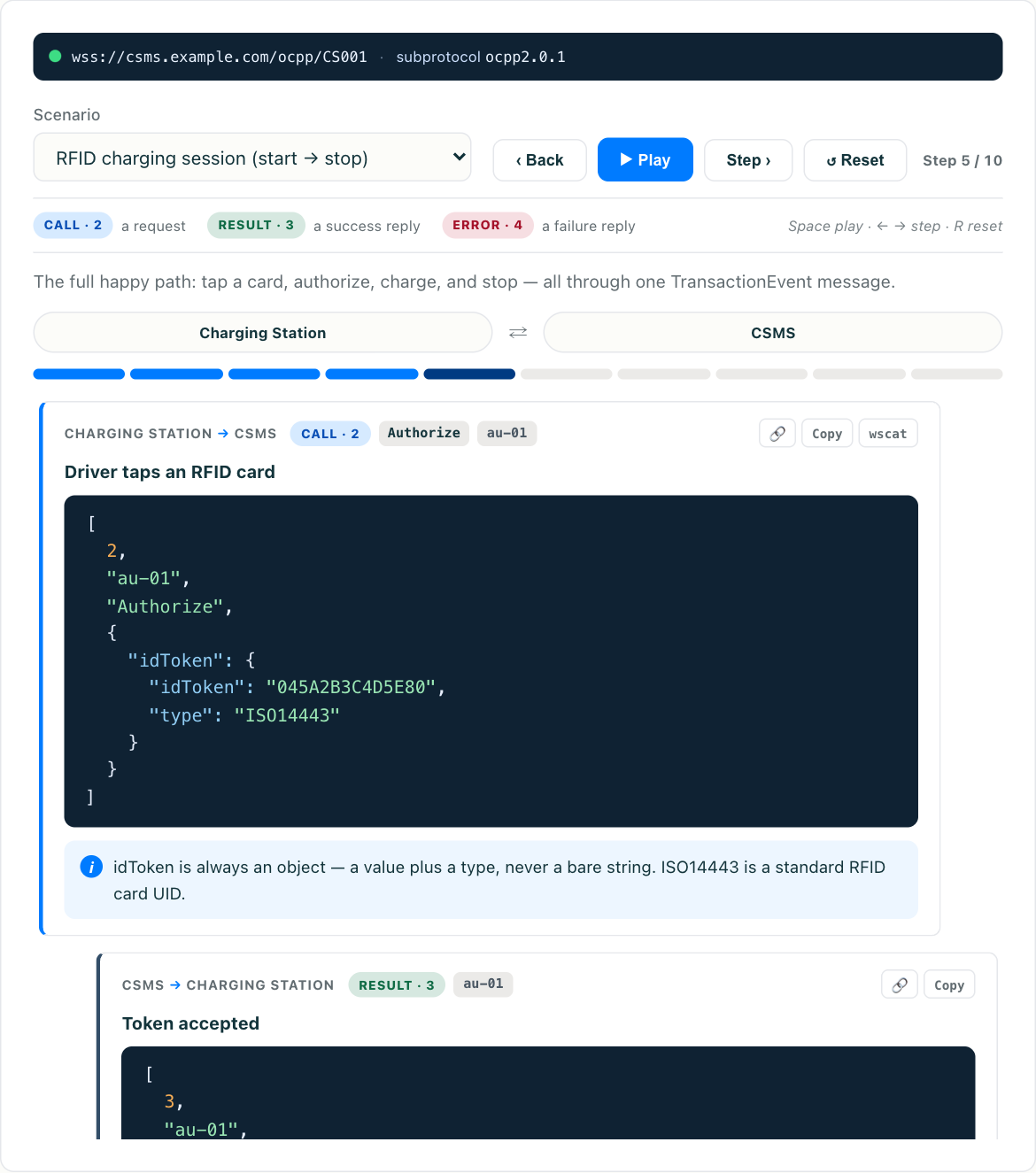
This article explains what an OCPP simulator does, how to read the message flow it produces, and where a browser-based walkthrough ends and a full send-your-own-messages test harness begins. If you are brand new to the protocol, start with what is OCPP for the big picture, then come back here for the hands-on view.
What an OCPP simulator actually simulates
OCPP is the protocol between a charging station and its back-end, the CSMS (Charging Station Management System). A simulator stands in for one side of that link so you can test the other, or, in a teaching tool, plays both sides so you can watch the whole exchange.
There are two broad kinds of OCPP simulator, and it helps to know which you need:
- A flow visualiser. It replays a realistic OCPP conversation step by step and lets you inspect every frame. You are not connecting real hardware. You are learning the sequence, the field names, and the timing, which is the fastest way to build an accurate mental model. Our OCPP 2.0.1 simulator is this kind.
- A live endpoint. It opens an actual WebSocket and either behaves like a charging station, so you can point your CSMS at it, or behaves like a CSMS, so you can point real firmware at it. This is what integration and QA teams use to test their own code against realistic counterpart behaviour, and it is the category open-source projects like EVerest and MicroOcpp occupy.
Both matter. You use the visualiser to understand the protocol, and a live endpoint to test your implementation of it. The first kind is easy to underrate: a large share of OCPP integration bugs come from misunderstanding the sequence rather than from a broken socket.
Reading the message flow
OCPP 2.0.1 runs as JSON over a WebSocket, a variant usually called OCPP-J. Every message on the wire is a small JSON array, and the first element is a number that tells you the message type:
2is a Call, a request.3is a CallResult, a successful response.4is a CallError, meaning something went wrong.
So a BootNotification request looks roughly like [2, "unique-id", "BootNotification", { ...payload... }], and the CSMS answers with [3, "unique-id", { ...payload... }]. The unique-id ties the response back to its request, which is essential because multiple messages can be in flight at once. Once you have seen this a few times in the simulator, OCPP stops being abstract and you can read it straight off a browser’s network tab in production. There is a library of copy-paste OCPP-J frames if you want reference payloads to work from.
The canonical opening sequence of a session goes like this:
- The station opens the WebSocket and immediately sends
BootNotificationto identify itself. The CSMS repliesAccepted,Pending, orRejected. Nothing else happens until this succeeds. See the BootNotification message for the full field breakdown and failure modes. - The station begins sending
Heartbeatat the interval the CSMS handed back, plus aStatusNotificationfor each connector so the backend knows what is available. - When a driver plugs in and presents a token, the station sends
Authorize, and the CSMS decides whether that token may charge. - The session itself is carried by
TransactionEventmessages:Started, then periodicUpdatedframes with meter readings, thenEnded. In 1.6 this was split acrossStartTransaction,MeterValues, andStopTransaction, and 2.0.1 unified them. The details are in the TransactionEvent message, and the full session walkthrough puts every step in order.
Watching those four stages play out frame by frame is the single most useful thing you can do to internalise OCPP, and it is exactly what the interactive tool steps you through.
Both directions matter
A common misconception is that the charging station does all the talking. It does not. OCPP is bidirectional, and the CSMS can initiate messages too. A remote start is the clearest example: the operator’s backend tells the station to begin a transaction on a driver’s behalf, which is what happens when someone starts a session from a mobile app. The station then runs the same TransactionEvent flow it would for a local plug-in.
Other CSMS-initiated commands include configuration changes, resets, firmware updates, and smart-charging profiles that cap or shape the power a station may deliver. A good simulator lets you see these reverse-direction flows, because they are where a lot of real integrations get tripped up. Teams build the station-to-CSMS path cleanly and then discover the command-and-control path behaves differently.
Worth saying plainly: the OCPP conversation has the same shape everywhere. A public fast-charging network in Germany and a workplace-and-fleet platform in the United States run the same message grammar, because the protocol is deliberately vendor-neutral and region-neutral. That is precisely why one simulator can stand in for hardware from any manufacturer. What differs between deployments is which optional features a given station and CSMS support, such as smart charging, ISO 15118 Plug and Charge, or local authorisation lists, and not the core grammar underneath.
From walkthrough to testing your own messages
Once the flow makes sense, the natural next step is to test your own code. Here is how the visualiser fits into a real workflow:
- Learn the sequence in the interactive simulator until you can predict the next frame before it appears.
- Diff against your logs. Pull the OCPP traffic from your own charger or backend and compare it message by message to the reference flow. Discrepancies jump out fast once you know what should be there.
- Test edge behaviour. What does your CSMS do when
BootNotificationreturnsPending? When anAuthorizeis rejected? When aTransactionEventarrives out of order after a reconnect? These are the cases that cause production incidents, and they are cheap to rehearse against a simulator. - Move to a live endpoint when you need to exercise your actual socket, TLS, and reconnection logic, which is the part a visual walkthrough deliberately abstracts away. The guide to testing without hardware covers the options and how to wire them into CI.
When something does go wrong on the wire, the failure is usually one of a small set of recurring patterns: a mismatched unique-id, a CallError the sender does not handle, a station stuck retrying BootNotification. We catalogue these in common OCPP errors explained, and every one of them is easier to recognise after you have watched the healthy flow first.
Try it
Reading about TransactionEvent frames is one thing. Watching a Started event turn into a stream of metered Updated events and then an Ended is another. Open the free OCPP 2.0.1 simulator, pick a scenario, and step through it. Inspect each frame, note which side sent it, and watch how the unique-id links request to response.
Fifteen minutes with the tool will teach you more about how OCPP behaves than an afternoon with the specification, and unlike the specification it will show you the order things happen in.