Most OCPP writing treats each message in isolation: here is BootNotification, here is MeterValues, here is StopTransaction. That is useful for reference, but it hides the thing that actually matters when you are debugging a live charger — the order. A charging session is not one message. It is an ordered conversation of roughly a dozen messages between the charge point and the CSMS, and when a session misbehaves, the fault is almost always in the sequence: a message that arrived out of order, never arrived, or arrived before the one it depends on.
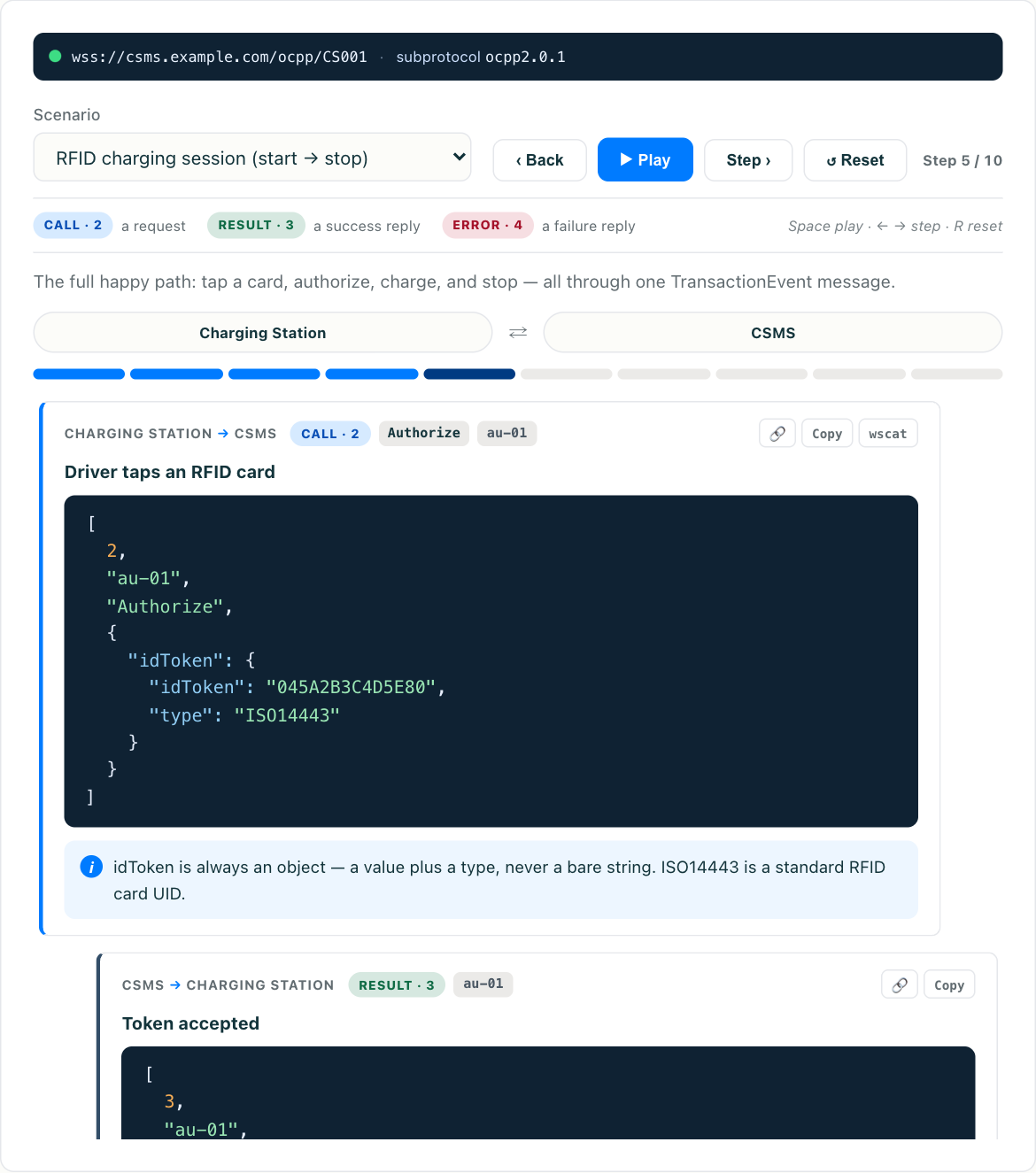
This article walks the entire flow start to finish, in order, for both OCPP 1.6 and 2.0.1. Once you have the sequence in your head, try the interactive OCPP simulator and replay it live — you can watch each message leave the charge point, see the CSMS response, and step through a full session at your own pace.
The two layers: connection and session
Before any energy flows, the charger and CSMS establish a working connection. That is a distinct phase from the session itself, and separating the two in your mind clears up most of the confusion:
- Connection layer — everything that keeps the charger online and reporting:
BootNotification,StatusNotification,Heartbeat. These happen once at startup and then continue in the background for the life of the connection. - Session layer — everything bracketed by a single charging transaction:
Authorize,StartTransaction,MeterValues,StopTransaction(or their 2.0.1 equivalents). These repeat for every car that plugs in.
A charger can sit connected and idle for hours, sending nothing but Heartbeat and the occasional StatusNotification, without a single session. The session messages only appear when someone actually charges.
The full OCPP 1.6 sequence
Here is a complete session from cold boot to unplug. Billions of live sessions still run on 1.6, so this is the flow most operators debug day to day.
sequenceDiagram
    participant CP as Charge Point
    participant CS as CSMS
    CP->>CS: BootNotification
    CS-->>CP: Accepted (interval, currentTime)
    CP->>CS: StatusNotification (Available)
    loop Every interval
        CP->>CS: Heartbeat
        CS-->>CP: currentTime
    end
    Note over CP: User taps RFID card
    CP->>CS: Authorize (idTag)
    CS-->>CP: Accepted
    CP->>CS: StatusNotification (Preparing)
    CP->>CS: StartTransaction (meterStart, idTag)
    CS-->>CP: transactionId, Accepted
    CP->>CS: StatusNotification (Charging)
    loop During session
        CP->>CS: MeterValues (energy, power...)
    end
    Note over CP: User unplugs
    CP->>CS: StopTransaction (meterStop, reason)
    CS-->>CP: Accepted
    CP->>CS: StatusNotification (Available)
Step by step:
BootNotification— the charger announces itself with vendor, model, and firmware. The CSMS repliesAcceptedalong with acurrentTime(which the charger uses to sync its clock) and aninterval(the Heartbeat cadence). Nothing else can happen until this isAccepted. The full field breakdown lives in the BootNotification message (coming soon) article.StatusNotification (Available)— the charger reports each connector’s state. Until the CSMS sees a connector asAvailable, it will not let a session start on it. Missing this message is a classic reason a healthy-looking charger refuses to serve cars.Heartbeat— sent at the interval from the boot response, this is the keep-alive that tells the CSMS the charger is still there. It runs continuously in the background for the rest of the session and beyond.Authorize— when the user presents a credential, the charger asks the CSMS whether theidTagis valid. The CSMS may check its own cache or query an eMSP over OCPI before answeringAcceptedorInvalid.StatusNotification (Preparing)— the connector moves out ofAvailableas the vehicle prepares to charge.StartTransaction— the pivotal session message. It carriesmeterStart(the meter reading at the beginning), theconnectorId, and theidTag. The CSMS responds with atransactionIdthat identifies this session everywhere downstream. The mechanics of this and its closing partner are covered in StartTransaction and StopTransaction (coming soon).StatusNotification (Charging)— the connector confirms energy is flowing.MeterValues— periodic readings of energy, power, voltage, current, and whatever else the charger samples. These are what your billing and dashboards consume; the details and the wide variation across OEMs are in the MeterValues message (coming soon) guide.StopTransaction— when the user unplugs or the session ends, the charger sendsmeterStop(final reading) and areason(for exampleLocal,Remote,EVDisconnected). Session energy ismeterStopminusmeterStart.StatusNotification (Available)— the connector returns toAvailableand the cycle can begin again.
Notice how StatusNotification threads through the whole sequence. It is not a one-time message; it fires on every state change, and it is your single best signal for what the connector is actually doing at any moment.
Where remote-start changes the order
Not every session begins with a card tap. When a driver starts charging from a mobile app, the CSMS is the initiator:
- The CSMS sends
RemoteStartTransactionwith theidTagalready inside it. - The charger accepts, and because the credential is already supplied, it can skip a separate
Authorizeround trip. - From there the flow rejoins the normal path:
StartTransaction,MeterValues,StopTransaction.
This is why “does a session always start with Authorize?” has no single answer — it depends on how the session was initiated. Remote start, cached local authorization, and plug-and-charge each shortcut or relocate the authorization step.
The OCPP 2.0.1 sequence
The connection layer in 2.0.1 looks almost identical: BootNotification, StatusNotification, Heartbeat. The session layer is where 2.0.1 makes its big simplification. Instead of three distinct messages, everything transaction-related flows through a single TransactionEvent message with an eventType field:
TransactionEvent (Started)replacesStartTransaction.TransactionEvent (Updated)replaces the stream ofMeterValues— the meter readings now ride inside the event.TransactionEvent (Ended)replacesStopTransaction.
sequenceDiagram
    participant CP as Charge Point
    participant CS as CSMS
    CP->>CS: BootNotification
    CS-->>CP: Accepted
    CP->>CS: StatusNotification (Available)
    CP->>CS: Authorize (optional)
    CS-->>CP: Accepted
    CP->>CS: TransactionEvent (Started)
    CS-->>CP: idTokenInfo
    loop During session
        CP->>CS: TransactionEvent (Updated, meterValue)
    end
    CP->>CS: TransactionEvent (Ended, meterValue, reason)
    CS-->>CP: Accepted
The payoff is that a single, well-defined message envelope carries the entire life of a transaction, each event tied together by a shared transactionId and an incrementing seqNo so the CSMS can detect gaps or reordering. The trade-offs, the sequencing rules, and the offline behavior are covered in the TransactionEvent in OCPP 2.0.1 (coming soon) deep dive.
The important mental shift: in 1.6 you reason about three message types; in 2.0.1 you reason about three event types of one message. The information carried is broadly the same. What changed is the envelope and the discipline around ordering.
What actually goes wrong in the sequence
Once you see a session as an ordered flow, the common failure modes name themselves:
- Boot accepted but no sessions. The charger connected and Heartbeats fine, but never sent
StatusNotification (Available)after boot, so the CSMS treats every connector as unknown and refuses to start. - StartTransaction with no matching Authorize. In deployments that require pre-authorization, a session that skips the auth step gets rejected downstream even though the transaction opened locally.
- MeterValues before StartTransaction. A reading arrives referencing a
transactionIdthe CSMS has not created yet, usually because messages were queued offline and replayed out of order. - Missing StopTransaction. The charger lost connectivity mid-session and never sent the close, leaving a “stuck” open transaction that has to be reconciled or force-closed.
- StatusNotification lag. The connector physically changed state but the notification was delayed, so the dashboard shows
Chargingon a connector that is actually free.
Every one of these is a sequencing problem, not a single-message problem. You cannot diagnose them by reading the spec for one message — you have to watch the whole conversation.
See the whole flow live
Reading the sequence is one thing; watching it unfold is another. The interactive OCPP simulator lets you replay a full session message by message — boot, status, authorize, transaction start, the MeterValues stream, and the close — for both 1.6 and 2.0.1. Step through it once end to end and the ordering stops being a diagram you memorize and becomes something you have actually seen happen.
If you are still building the foundations, the individual message guides linked above go one level deeper on each step. But keep coming back to the sequence — because in production, the order is the thing that breaks.