If you are building or integrating a CSMS — a Charging Station Management System — the single most annoying blocker is hardware. A physical charge point is expensive, slow to ship, awkward to power, and impossible to keep on your desk in the ten variations you actually need to test. The good news: for almost all backend testing, you do not need one. A charge point, from your server’s point of view, is nothing more than a WebSocket client that sends and receives JSON. You can reproduce every message it would ever send, in software, from a laptop.
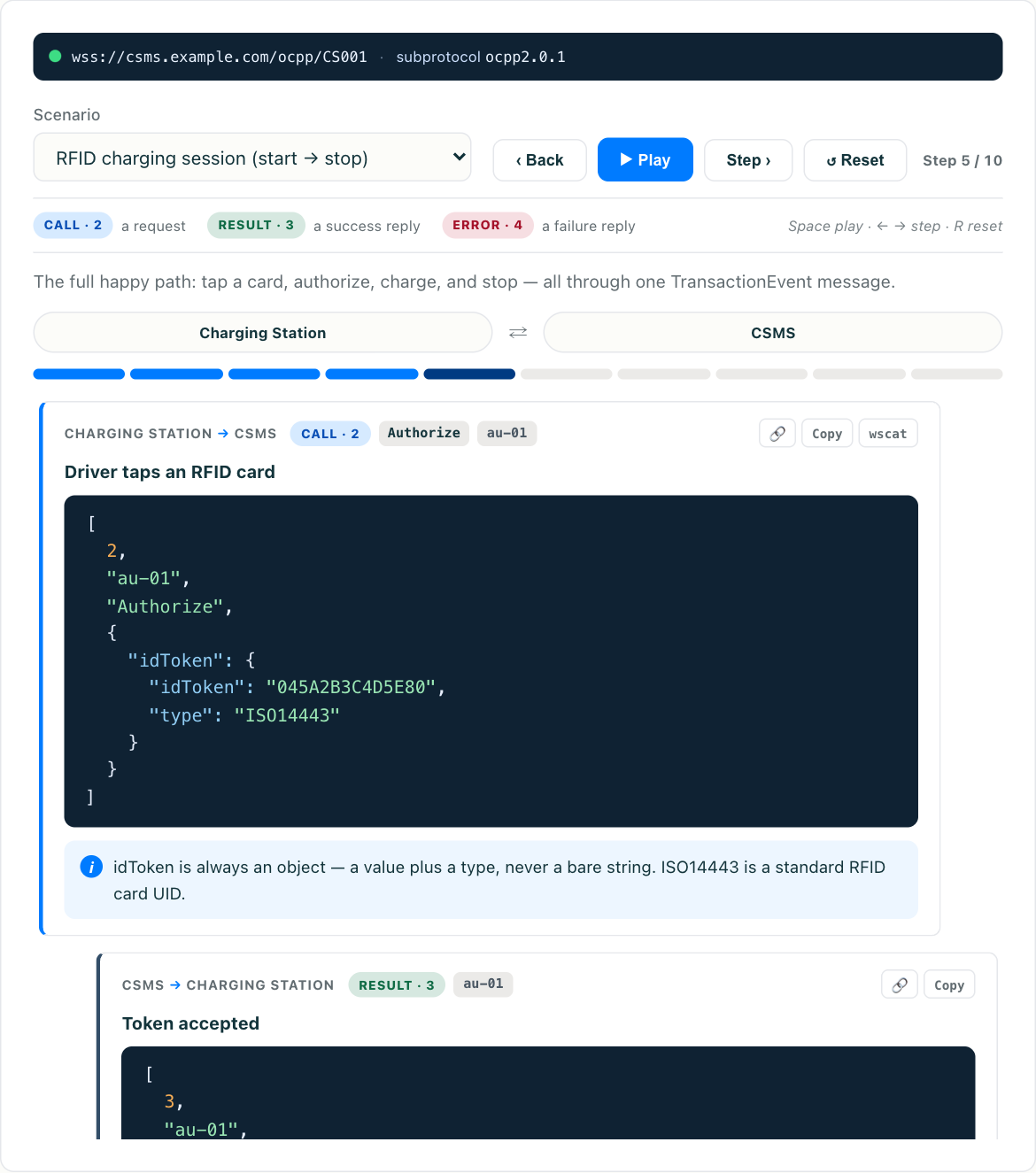
This article walks through how to test an OCPP charge point without any hardware — what you can validate this way, what you genuinely cannot, and how to build a repeatable integration-testing workflow. If you want to see it immediately, try the interactive OCPP simulator — it opens a live OCPP session in your browser and lets you fire messages at a backend and watch the responses on the wire. Everything below explains what those messages mean and how to turn ad-hoc poking into a real test suite.
Why software simulation actually works
OCPP 1.6 and 2.0.1 both run over WebSocket, and both carry JSON payloads. There is no proprietary binary framing, no special radio, no magic. When a real charge point boots, it opens a WebSocket connection to a URL like wss://csms.example.com/ocpp/CP-0001, then sends a BootNotification. Your backend has no way to know whether the bytes on that socket came from a €4,000 DC fast charger or a 40-line script. As long as the messages are well-formed and arrive in a plausible order, the CSMS processes them identically.
That is the whole trick. If you want a refresher on what these messages are and how the charge-point-to-backend relationship works, the What Is OCPP explainer covers the fundamentals. Here we assume you know the basics and want to exercise them.
The practical upshot: you can validate authorization logic, transaction accounting, meter-value ingestion, smart-charging profiles, remote commands, connector-state tracking, and error handling — the overwhelming majority of what a CSMS does — entirely in software.
The minimum viable test session
A simulator does not need to be clever. It needs to reproduce a real charger’s message sequence. The canonical happy-path session looks like this:
- Open the WebSocket to the CSMS endpoint, negotiating the
ocpp1.6orocpp2.0.1subprotocol in the connection headers. - Send
BootNotificationwith a vendor and model. Wait forAcceptedplus a heartbeat interval. - Send
StatusNotificationto report the connector asAvailable. - Start heartbeating on the interval the backend returned, so the CSMS considers the charger online.
- Send
Authorizewith an RFID or token ID and confirm the backend accepts or rejects it. - Start a transaction —
StartTransactionin 1.6, orTransactionEventwitheventType: Startedin 2.0.1 — including a start meter reading. - Send periodic
MeterValues(orTransactionEvent (Updated)) climbing in energy, so you can check the backend’s session accounting. - Stop the transaction —
StopTransactionorTransactionEvent (Ended)— with the final meter reading. - Return the connector to
Available.
If your backend handles that sequence correctly — accepts the boot, tracks the connector state, authorizes the token, opens a session, accumulates energy, closes the session, and produces a correct total — you have validated the core of your integration without touching a charger. The OCPP simulator runs exactly this flow interactively so you can watch each request and response.
What you can test with no hardware
Once the basic session works, the same approach scales to the harder cases, which are the ones actually worth testing:
- Authorization edge cases. Send an unknown token, an expired token, a blocked token. Confirm the CSMS returns the right
idTagInfo/idTokenstatus and that the charger-side logic (which you are simulating) would refuse to start. - Remote start and stop. Have your simulator sit idle, then trigger a
RemoteStartTransaction(1.6) orRequestStartTransaction(2.0.1) from the backend and confirm your simulated charger responds correctly. This is exactly the app-initiated flow covered in OCPP remote start and stop (coming soon), and it is much easier to iterate on in software than by tapping a phone against a real unit. - Meter-value fidelity. Send
MeterValueswith different measurands —Energy.Active.Import.Register,Power.Active.Import,SoC, temperature — and confirm they land in the right place in your data model. - Connector-state machines. Walk through
Available → Preparing → Charging → SuspendedEV → Finishing → Availableand confirm dashboards and availability logic follow along. - Error and fault handling. Report a
StatusNotificationwith aFaultedstate and an error code. Many integration bugs live here, and they map directly to the failure modes in common OCPP errors explained (coming soon). - Security profiles. Point the simulator at a
wss://endpoint with Basic auth headers (Profile 1/2) or a client certificate (Profile 3) and confirm your backend enforces what it should. The mechanics of each profile are laid out in OCPP security profiles (coming soon). - Scale. Because a simulated charger is cheap, you can spin up hundreds of WebSocket connections at once to load-test your CSMS’s connection handling, heartbeat processing, and database write throughput.
Building a repeatable workflow
Clicking buttons in a simulator is great for exploration. For real integration testing you want repeatability, so structure it like any other test suite.
Script the sequences. Capture your happy-path session and each edge case as a defined series of messages with expected responses. Whether you drive this from a browser tool, a small Node or Python client, or a test framework, the key is that “boot, authorize, start, meter, stop” becomes a named, re-runnable scenario rather than something you retype.
Assert on responses, not just sends. A message going out is not a test. The test is that BootNotification returns Accepted, that Authorize returns the expected status, that the final StopTransaction produces the correct total energy. Encode those expectations.
Pin the OCPP version per scenario. Because 1.6 and 2.0.1 use different transaction messages, keep separate scenarios per version rather than trying to branch inside one. Run both against your backend if you support both.
Seed known data. Authorization tests only mean something if you know which tokens are valid, blocked, and unknown in the backend. Set up that fixture data before the run so results are deterministic.
Watch the wire. OCPP’s array format — [2, "id", "Action", {...}] for a Call, [3, "id", {...}] for a result — is human-readable. Keep the raw frames visible during development so that when something breaks you can see whether it was a malformed payload, a wrong message ID correlation, or a genuine backend bug. This habit alone catches a huge share of integration problems.
What simulation cannot catch
Being honest about the limits matters, because a green test suite that quietly skips the physical layer can lull you into a false sense of readiness.
A simulator cannot exercise actual power electronics: contactor switching, ground-fault detection, the IEC 61851 control-pilot handshake, or real energy metering accuracy. It cannot validate an RFID reader, a payment terminal, or a display. It cannot run true ISO 15118 Plug and Charge cable communication, which happens between the vehicle and the charger below the OCPP layer. And it will not reveal quirks specific to one manufacturer’s firmware — the off-spec status transitions, the vendor DataTransfer extensions, the timing oddities that only show up on real units in the field.
The right mental model: software simulation gets you through roughly the first ninety percent — all of the protocol logic and backend behaviour — quickly, cheaply, and repeatably. Real hardware, and ideally a small fleet of different OEMs, is for the final validation of the physical and vendor-specific last mile. Do the cheap ninety percent first, so that when you finally put a real charger on the bench you are debugging hardware, not rediscovering that your session accounting was wrong all along.
Start here
The fastest way to internalise all of this is to watch the messages flow. Open the OCPP simulator, connect it to a backend, and run a full session — boot, authorize, start, meter, stop. Once you have seen the round-trip and understood the array wire format, scripting your own repeatable scenarios is straightforward, and you can build a genuinely useful CSMS integration test suite before a single charger arrives at your door.