You pull up to a charger, look at the cable hanging there, and ask the only question that matters in that moment: will my car actually charge here? The plug either fits or it does not, but fitting is only the first of three things that have to line up. This guide walks through all three, and you can try the interactive connector compatibility checker to test any car-and-station pairing in seconds.
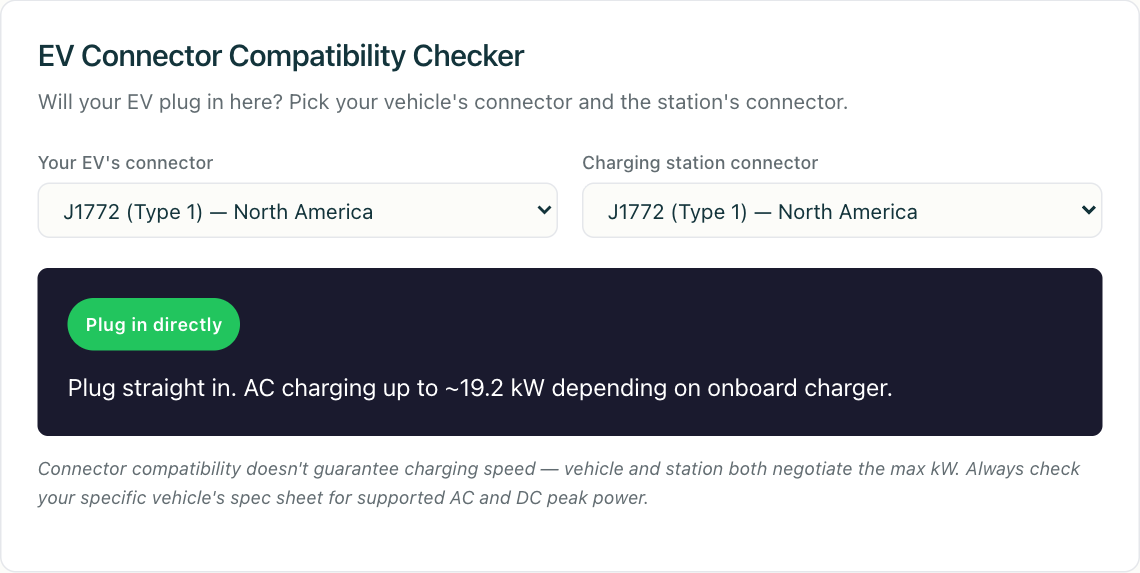
The short version: charging works when the connector matches, the power type and level are something your vehicle can accept, and you have a way to authorize the session. Miss any one and the cable stays cold.
Step one: does the connector physically match?
This is the part most people mean when they ask the question, and it is the easiest to check. Six connectors cover what you will realistically encounter, split cleanly between AC and DC:
- J1772 (Type 1): the North American AC standard, defined by SAE J1772. AC only, used for both Level 1 and Level 2.
- Type 2 (Mennekes): the European AC standard from IEC 62196-2. AC only, single-phase or three-phase.
- CCS1 (Combo 1): the North American DC fast-charging standard. It adds two DC pins below a J1772 plug, so a single inlet handles both AC and DC.
- CCS2 (Combo 2): the European DC equivalent, built the same way on a Type 2 body.
- CHAdeMO: a DC standard of Japanese origin with its own dedicated inlet and its own CAN-based signalling, physically separate from the AC inlet on the same car. What is CHAdeMO (coming soon) covers how it differs.
- NACS (J3400): originally Tesla’s connector, since published as SAE J3400, carrying both AC and DC through one small plug.
The reason a CCS car cannot use a CHAdeMO cable is not the shape alone. The two run different communication protocols, so even a mechanically perfect adapter would have to translate one protocol into the other while the session is live. For the combinations that do work, and the ones that quietly do not, see our EV charging adapters compatibility guide (coming soon). For the full anatomy of each plug, EV charging connectors explained breaks them down pin by pin, and what is a CCS connector (coming soon) goes deep on how the combo inlet is wired.
Step two: AC or DC, and can your car take the power?
A matching plug can still leave you charging far slower than you expected, because connector shape and power delivery are separate questions.
Start with AC versus DC. J1772 and Type 2 carry AC only. When you plug into an AC station, the conversion happens inside your car, in the onboard charger, which rectifies AC to DC before anything reaches the battery. That onboard charger is fixed hardware with a fixed rating, and the rating is just voltage times current: a 32 A single-phase circuit at 240 V tops out around 7.7 kW regardless of how large the station behind it is. When the station can supply more than the onboard charger accepts, the surplus is simply unused. AC vs DC charging explained (coming soon) covers why that ceiling exists and where it sits.
DC fast charging (CCS, CHAdeMO, and NACS in DC mode) bypasses the onboard charger and feeds the pack directly, which moves the ceiling somewhere else entirely. Now the limit comes from the battery: its voltage, its temperature, and its state of charge. The station advertises a maximum, but the vehicle requests a current and the station supplies what it can, so delivered power falls as the pack fills and the cells accept less. That is why “will it charge?” is nearly always yes while “how fast?” depends far more on the car and the pack temperature than on the number painted on the cabinet. Our post on reading EV charger specifications (coming soon) explains how to turn a station’s rating into something you can plan around, and Level 1 vs Level 2 vs DC fast charging puts the tiers side by side.
The practical takeaway: an underpowered pairing still charges, just slowly. The failure people actually hit is a type mismatch, arriving at an AC-only Type 2 or J1772 post while expecting DC speed. The connector checker flags which combinations deliver true DC fast charging and which are AC only, so the surprise lands on screen instead of at the plug.
Step three: can you authorize the session?
This is the step people forget, and it produces more “the plug fit but nothing happened” moments than any physical mismatch. Before a single amp flows, the charger and the car negotiate over the control pilot line, and separately the station checks whether you are permitted to draw energy at all.
Authorization takes one of a few paths: an RFID card held to the reader, a session started from the operator’s app, or a certificate-based exchange between car and charger under Plug and Charge. If you hold no account with that operator, or your provider has no roaming path into it, a perfect physical fit will not save you. The session is refused at the authorization layer, well before the contactor closes. Our guide to RFID vs. Plug and Charge vs. app authentication (coming soon) walks through each path and where each one trips up.
Underneath, this is where the charging protocols do their work. An OCPP-speaking station sends an Authorize request to its backend, or validates a cached token locally, before it energizes the connector. It also reports connector state through StatusNotification, so a connector sitting in Faulted or Unavailable will refuse a perfectly matched plug and no amount of replugging will change that. Roaming, the arrangement that lets one account work across operators, runs over OCPI: the eMSP and the CPO exchange tokens, locations, and session records so the operator can answer “is this driver good for it?” without ever holding your account. What is OCPI explains that exchange, and what to do when a charger fails mid-session (coming soon) picks up the story after power has already started flowing.
The NACS transition changes what “matching” means
North America is in the middle of a connector change, and it makes step one temporarily more interesting. NACS was published as SAE J3400, which turns it from a single company’s interface into an open standard any manufacturer can implement in a vehicle or a station. The visible result at the curb is stations that hang a NACS cable and a CCS1 cable off the same unit, which is more forgiving rather than less: more cars fit more cables.
The awkward case is the in-between vehicle. A CCS1 car at a NACS-only station needs a CCS1-to-NACS adapter plus an account that operator accepts, and a NACS car at a legacy CCS1 station needs the reverse. Both directions are electrically tractable because NACS and CCS1 use the same underlying DC communication, which is exactly why adapters exist for this pair and not between CHAdeMO and CCS. Europe sits outside all of it: EU DC fast charging is built on CCS2, and the AFIR regulation sets the connector requirements for new public recharging points there. For the switch itself, the NACS / J3400 switch explained (coming soon) is the deeper read, and the Tesla Supercharger network explained (coming soon) covers how that network’s access model is structured.
Put it together at the plug
Three checks, in order:
- Connector: does the physical plug match, or do you carry a real adapter for that pair?
- Power: is it AC or DC, and is the ceiling set by your car (usually fine) or by a type mismatch (charges, but slowly)?
- Authorization: do you have an account, card, or roaming path this operator accepts?
If all three are yes, you are charging. To check a specific car-and-station combination, including which pairs need adapters and which deliver true DC fast charging, run it through the connector compatibility checker.
One thing worth noticing about that list: only the third item is negotiable while you are standing there. The connector is a fact about your car, and the power ceiling is a fact about your battery, but authorization is the only layer where a second payment method, a different app, or two minutes on the phone with the operator’s support line can turn a dead cable into a running session. Run the checks in that order for a reason. The first two tell you whether to stay, and the third tells you what to try.